On the 18th of March creators of a third-party Telegram client called “Telega” activated a hidden feature that enables interception of all traffic between users of their applications and Telegram servers by putting it through servers controlled by them.
Unfortunately, there’s not much info about that, so we’ve made this article with a comprehensive and reproducible analysis of malicious behaviour.
If you aren’t interested in all the technical details, but want to know more about the whole situation — read the “TL;DR” part of every paragraph below.
A preface for people outside of Russia
Telegram is a messenger that is used by almost everyone in Russia. Roskomnadzor (RKN), a Russian communications regulator, began a nationwide ban of Telegram on the 10th of February, 2026.
Telega (Russian slang word for Telegram) is a third-party Telegram client developed in Russia by (what they describe) a small independent team of developers. The same team was previously scrutinised by independent researchers, who found ties to VK Group — a Russian state-owned corporation, owner of the VKontakte social network and the state-owned messenger Max.
Telega was advertised in Telegram’s native ad network as a solution to the government blocks of Telegram “without using a VPN” and many believed it.
Background about Telegram’s client-server encryption protocol
Telegram has multiple data centres in different parts of the world — each one has one or multiple IP addresses. For example, DC1, that most of Telegram users in USA connect to has the following single IP address: 149.154.175.53. (source)
When a Telegram client initiates a connection to a DC, it generates random encryption parameters, encrypts them using a hardcoded public RSA key and then sends them to the server, which decrypts this data using the corresponding private key.
In other words, Telegram client uses a public RSA key that is already known beforehand to establish an initial secure channel with the server to generate and negotiate a new symmetric AES key — a procedure known as a handshake. (source)
TL;DR: a Telegram client has hardcoded data centre IP addresses and encryption keys to establish a secure channel.
How does Telega interfere with a secure handshake: IP address spoofing
We’ll focus on the current latest version of Telega for Android (sha256 ca47b6..6d34f0) and decompile it using jadx.
Let’s search for dc-proxy in the decompiled files. We’ll find these pieces of code:
ru/dahl/messenger/dc/DCRestService.java:
public interface DCRestService {
    @GET("dc-proxy")
    Object getDcConfig(Continuation<? super DcConfig> continuation);
}ru/dahl/messenger/data/rest/RestClient.java:
public static final String API_URL = "https://api.telega.info/v1/";From those we can infer that the application makes an HTTP GET request to the URL https://api.telega.info/v1/dc-proxy, which returns a JSON object with a { "dc_version": 2 } value, and an array called dcs in the following format:
{ "dcs": [{ "id": 2, "addresses": [{ "host": "130.49.152.41", "port": 443}] }] }
Where id is a value from 1 to 5 (corresponding to Telegram DC index numbers), and all IP addresses are in the 130.49.152.0/24 range and are owned by AS203502 JOINT STOCK COMPANY "TELEGA", which was registered on 24th of November, 2025.
An interesting detail: the sole upstream of this autonomous system is AS47764 LLC VK (Mail.ru), and they also own the adjacent subnet of 130.49.224.0/19. This may point to Telega being owned by VK Group, a Russian government-affiliated corporation. It’s hard to understand how a “small startup” which they claim to be has the funds to make their own AS and get a whole /24 subnet of IPv4 addresses.
So, the application is getting IP addresses of servers that are controlled by Telega and which are meant to replace the default Telegram data centre addresses.
After this the applyDcVersion() method is called in the DCAuthHelper.java class:
public final Object applyDcVersion(
    final int r17, // dcVersion (2)
    final java.util.List<ru.dahl.messenger.dc.entity.Datacenter> r18, // Telega DC addresses
    final ru.dahl.messenger.dc.entity.DcOptions r19,
    final boolean r20,
    kotlin.coroutines.Continuation<? super kotlin.Unit> r21
)
Inside of this method, presumably, a public function ConnectionsManager.setDcVersion is called with new addresses:
// ConnectionsManager.java:1934-1935
public void setDcVersion(int version, int[] dcIds, String[] addresses,
                          int[] ports, boolean[] flags, boolean usePfs,
                          String[] transports) {
    native_setDcVersion(this.currentAccount, version, dcIds, addresses,
                        ports, flags, dcIds.length, usePfs, transports);
}
This is indirectly indicated by the semi-decompiled code at DCAuthHelper.java:379 which checks if the dcVersion value was updated with the target one:
ConnectionsManager r7 = ConnectionsManager.getInstance(r7);
int r7 = r7.getDcVersion();
int r8 = this.$dcVersion;
if (r7 != r8) { /* not yet */ }
In total we have approximately this chain of function calls:

Note that the AuthTokensHelper.clearLogInTokens() call during the DC change does not delete the auth_key (session encryption key) — this is done via another mechanism which we will cover later.
TL;DR: Telega app changes the legitimate Telegram server addresses to those controlled by them after a command from their infrastructure.
RSA public key spoofing
A Man-in-the-middle attack on Telegram is not possible if the hardcoded RSA key is not replaced. To find the Telega’s own RSA key we need to decompile a dynamic library called libtmessages.49.so which is also present in the same APK file. This exact library implements the native_* methods used in ConnectionsManager class.
Let’s open IDA Pro and feed it the library file, an arm64 variant in this case. After pressing Shift+F12 the strings window will open. Let’s find all RSA keys by the “BEGIN RSA PUBLIC KEY” header (Ctrl+F), and we find 4 keys:
Key #1 at 0x1576FFC:
-----BEGIN RSA PUBLIC KEY-----
MIIBCgKCAQEAyr+18Rex2ohtVy8sroGPBwXD3DOoKCSpjDqYoXgCqB7ioln4eDCF
fOBUlfXUEvM/fnKCpF46VkAftlb4VuPDeQSS/ZxZYEGqHaywlroVnXHIjgqoxiAd
192xRGreuXIaUKmkwlM9JID9WS2jUsTpzQ91L8MEPLJ/4zrBwZua8W5fECwCCh2c
9G5IzzBm+otMS/YKwmR1olzRCyEkyAEjXWqBI9Ftv5eG8m0VkBzOG655WIYdyV0H
fDK/NWcvGqa0w/nriMD6mDjKOryamw0OP9QuYgMN0C9xMW9y8SmP4h92OAWodTYg
Y1hZCxdv6cs5UnW9+PWvS+WIbkh+GaWYxwIDAQAB
-----END RSA PUBLIC KEY-----
Key #2 at 0x15788E1:
-----BEGIN RSA PUBLIC KEY-----
MIIBCgKCAQEAum9pZNEIWVt6jQUm/qcP4na0RgWHfSls/TJwxYQTsruNyuVgdrBu
y7gbNcObgnxmjxohwRjkNCOASwfYOD5yZ0UUqlg+iK84cmS8HdSublM/Bvf4huqN
7RZ0GXQ8nGCZQFQ67ZqXS5R/4XNUmoj5kmhHOl7OU4ow3DXdjM3JEmvaVtacGoMW
BT2s1JtTt3bXVJmarBxt3g8yn+lmAs7aCZkVj0cdocHT7jOyPaCtvSC+pGThr7qA
aDEWl2q8Z4fH1hYF3xrm4vxraJq4fFIbuBLceMKfHsI7ahL4KLF/tYNNZzbfaE5s
4Z2HPiEI+78hAdxCWAnQd9Efj2Dbc6OM2wIDAQAB
-----END RSA PUBLIC KEY-----
Key #3 at 0x1578A8B:
-----BEGIN RSA PUBLIC KEY-----
MIIBCgKCAQEAyMEdY1aR+sCR3ZSJrtztKTKqigvO/vBfqACJLZtS7QMgCGXJ6XIR
yy7mx66W0/sOFa7/1mAZtEoIokDP3ShoqF4fVNb6XeqgQfaUHd8wJpDWHcR2OFwv
plUUI1PLTktZ9uW2WE23b+ixNwJjJGwBDJPQEQFBE+vfmH0JP503wr5INS1poWg/
j25sIWeYPHYeOrFp/eXaqhISP6G+q2IeTaWTXpwZj4LzXq5YOpk4bYEQ6mvRq7D1
aHWfYmlEGepfaYR8Q0YqvvhYtMte3ITnuSJs171+GDqpdKcSwHnd6FudwGO4pcCO
j4WcDuXc2CTHgH8gFTNhp/Y8/SpDOhvn9QIDAQAB
-----END RSA PUBLIC KEY-----
Key #4 at 0x1578C35:
-----BEGIN RSA PUBLIC KEY-----
MIIBCgKCAQEA6LszBcC1LGzyr992NzE0ieY+BSaOW622Aa9Bd4ZHLl+TuFQ4lo4g
5nKaMBwK/BIb9xUfg0Q29/2mgIR6Zr9krM7HjuIcCzFvDtr+L0GQjae9H0pRB2OO
62cECs5HKhT5DZ98K33vmWiLowc621dQuwKWSQKjWf50XYFw42h21P2KXUGyp2y/
+aEyZ+uVgLLQbRA1dEjSDZ2iGRy12Mk5gpYc397aYp438fsJoHIgJ2lgMv5h7WY9
t6N/byY9Nw9p21Og3AoXSL2q/2IJ1WRUhebgAdGVMlV1fkuOQoEzR7EdpqtQD9Cs
5+bfo3Nhmcyvk5ftB0WkJ9z6bNZ7yxrP8wIDAQAB
-----END RSA PUBLIC KEY-----
Now let’s download the latest release of Telegram for Android from the official website (https://telegram.org/dl/android/apk), unpack the APK file with an archiver program and feed IDA Pro the same library (sha256 5ebcea..0176c9) and compare the keys.
It turns out, in the original library from Telegram there are only 3 of the 4 keys present, compared to Telega’s version:
| Key address in Telega | Key address in Telegram | SHA-256 |
|---|---|---|
0x1576FFC | 0x15704DC | 76f57758..4583493e |
0x15788E1 | - | 7f7d5bd9..104f3fe1 |
0x1578A8B | 0x1571CAE | 2652db36..10beb77f |
0x1578C35 | 0x1571E58 | abaec5de..041348db |
Key hashes were generated using this command:
openssl rsa -in pub.pem -pubin -outform DER 2>/dev/null | openssl dgst -sha256
So the 2nd key at 0x15788E1 was implanted into Telega by their creators. To avoid the long digging in the library’s source files, let’s do a simple test — we’ll try to connect to the DC 2 server by Telega using the extra key, and then do the same with the original Telegram one.
We’ve asked Claude Opus to write a simple Python script that will perform an initial handshake with an MTProto server, here’s the result: mtproto_handshake_test.py. You can ask an AI of your choice to explain how it works.
Let’s launch the script, first with the legitimate Telegram DC2 address:
$ python3 mtproto_handshake_test.py 149.154.167.50
Key fingerprint: 0x2c945714333b5ebd  (2048-bit)
Server:          149.154.167.50:443  (DC 2)

Server fingerprints: ['0xd09d1d85de64fd85', '0x0bc35f3509f7b7a5', '0xc3b42b026ce86b21']
Our fingerprint in list: False

RESULT: transport error -404
The server could not decrypt our payload.
⇒ Server does NOT hold the private key for this RSA key.
The script tells us that the Telegram server indicates all the fingerprints of RSA public keys that can be used to establish a connection, but the Telega one is not there. When trying to perform a handshake, the server returns a transport error with code -404, because it simply cannot decrypt the data that was encrypted with a key that is unknown to it.
Now let’s do the same but with Telega’s DC2 address:
$ python3 mtproto_handshake_test.py 130.49.152.41
Key fingerprint: 0x2c945714333b5ebd  (2048-bit)
Server:          130.49.152.41:443  (DC 2)

Server fingerprints: ['0x2c945714333b5ebd']
Our fingerprint in list: True

RESULT: server_DH_params_ok
The server successfully decrypted our payload.
⇒ Server HOLDS the private key for this RSA key.
Telega’s DC happily offers the same key and completes the handshake successfully.
TL;DR: There’s an extra RSA public key implanted into Telega which is rejected by legitimate Telegram servers and is only accepted by Telega’s ones.
What can they do with the spoofed servers and keys?
As was pointed out in the beginning, the RSA encryption in Telegram is used by client and server during the initial handshake to generate a new secret encryption key, which is then used to encrypt all the traffic between the two parties.
Because the handshake is performed only once on the first ever connection between Telegram client and server (e.g. when a user just installed the app and didn’t even log into their profile), another mechanism was added into Telega — the app can perform a logout from all accounts on command from the Telega’s server, deleting all the information about the connection with the server, including the secret encryption key.
Method DCEventHandler.performSoftLogoutForAllAccounts:
public final void performSoftLogoutForAllAccounts() {
	try {
		int maxAccountCount = getBridge().getMaxAccountCount();
		for (int i = 0; i < maxAccountCount; i++) {
			if (getBridge().isClientActivated(i)) {
				getBridge().logout(i);
			}
		}
		Napier.d$default(Napier.INSTANCE, "DC Event: soft logout completed for all accounts", null, null, 6, null);
	} catch (Exception e) {
		Napier.e$default(Napier.INSTANCE, "DC Event: error during soft logout", e, null, 4, null);
	}
}
Method TelegramBridge.logout:
public void logout(int i) {
	clearDismissedPromos();
	UserConfig.getInstance(i).clearConfig(); // удаляет сессию и ключ шифрования (auth_key)
	MessagesController.getInstance(i).performLogout(0); // отправляет серверу сигнал о выходе из аккаунта
	ConnectionsManager.getInstance(i).cleanup(true); // убивает все соединения
}
This mechanism is initiated in several different ways:
- A hidden push notification from Telega’s server with
type=dc_update_versionandforce_relogin=truefields (TelegaPushHandlerclass) - A hidden push notification from Telega’s server with
type=dc_force_switchandforce_reconnect=truefields (TelegaPushHandlerclass) - After following a deep link
tg://dc_event?force_relogin=trueortg://dc_event?force_reconnect=true(DCDeepLinkHandler) - Promo banner with a call to”migrate”
(
PromoRestClient,DahlBannerCell,DCMigrationHelper)
The last one shows the user a promo banner with the following text:
Please log back into your account to speed up the connection
We are switching to dedicated servers for maximum speed and stability of calls, chats, and media downloads. You just need to log back into your account.
We don’t know if this exact banner was shown during the MitM activation on the 18th of March, but the wording of this message shows that Telega acts like any other malicious software — it offers the user speed and stability, but steals their Telegram accounts under the hood and implants a persistent wiretap.
Because Telega with their dc-proxy is controlling the handshake, it means that right now they are doing a classic Man-in-the-middle attack on their users — they agree with the user on one encryption key and another one with the Telegram server, and, being in the middle of the server and client, they can watch, store and modify all the traffic between them.

TL;DR: Telega can, without the user’s knowledge
- Watch all incoming and outgoing messages in any chat
- Go through the chat history in any chat
- Spoof the message content — for example, block the objectionable channels with the reason of “Telegram ToS violation” (not Telega!)
- Store all the information and actions that a user does in Telegram and pass it to any third parties — especially Russian authorities
- Execute absolutely any action from a user’s account without their knowledge or consent.
Disabling Perfect Forward Secrecy
PFS is a security mechanism that guarantees inability to read old traffic if a malicious actor gets your secret encryption key. In Telegram’s MTProto it is implemented like this: instead of using a long-term encryption key that never changes (auth_key), the client and server generate a temp_auth_key approximately once in 1-2 days and encrypt all the traffic using it.
In the official first-party Telegram clients the flag indicating the usage of PFS is hardcoded to true during build time and cannot be changed later.
In stark contrast, in Telega this flag is off by default and its state is controlled by their server via the same /dc-proxy endpoint. There’s an options object in the response that can control PFS. This is indicated by a value DcConfig.options.use_pfs (Boolean?, JSON: "use_pfs") which is then used in the method DCRepository.handleDcConfig():
DcOptions options = dcConfig.getOptions();
boolean usePfs = false; // ← off by default
if (options != null && options.getUsePfs() != null) {
	usePfs = options.getUsePfs().booleanValue();
}
Then in DCAuthHelper.applyDcVersion():
boolean usePfs = dcOptions != null ? dcOptions.getUsePfs() : false;

ConnectionsManager.setDcVersion(
	dcVersion=2,
	dcIds, hosts, ports, ipv6,
	usePfs, // ← PFS switch
	transports
);
The ConnectionsManager.setDcVersion method then passes this flag into a native function native_setDcVersion.
TL;DR: Telega has turned off the additional Telegram security measures that prevents interception and decryption of client-server traffic.
Disabling secret chats
Secret chats in Telegram are end-to-end encrypted, meaning even the server doesn’t know the contents of messages in them. Secret chat keys never leave the user’s device.
Telega for Android fetches a remote configuration from Google’s Firebase every hour and processes it in FeatureManager class. The current remote config looks like this — secret chats are disabled by the enable_sc = false flag:
{
  "entries": {
    "ads_control": "true",
    "autosubscribe_channel": "true",
    "chat_invite_friend_modal": "false",
    "chat_invite_sticky_banner": "false",
    "connection_no_vpn_mode": "true",
    "connection_settings": "true",
    "connection_stable_calls": "true",
    "contact_list_invite_friend": "true",
    "dialogs_invite_friend_button": "false",
    "enable_sc": "false",
    "group_video_calls": "false",
    "invite_friend": "false",
    "moderation_enabled": "false",
    "p2p_video_calls": "true",
    "parental_control_core": "true",
    "parental_control_menu_item": "false",
    "profile_invite_friend_item": "true",
    "settings_invite_friend_item": "true",
    "sidemenu_invite_friend": "true",
    "telega_calls": "true",
    "telega_group_calls_attach": "false",
    "telega_group_calls_chat": "false",
    "telega_p2p_calls": "true",
    "telega_wall": "true",
    "telegram_call_fallback": "false",
    "waitlist": "none",
    "waitlist_enabled": "true"
  },
  "state": "UPDATE",
  "templateVersion": "472"
}
Flag enable_sc is processed by FeatureManager and is used in the following places:
SecretChatHelper.acceptSecretChat:
public void acceptSecretChat(final TLRPC.EncryptedChat encryptedChat) {
    if (this.acceptingChats.get(encryptedChat.id) == null && FeatureManager.currentInstance().isSCEnabled()) {
        // here's the logic for accepting secret chat requests
    }
}
Because the method FeatureManager.currentInstance().isSCEnabled() returns false, all incoming secret chat requests are silently ignored by Telega and the user never gets to know about it.
Besides all of that, Telega hides the “New secret chat” button from UI and ignores the deep links to secret chats.
TL;DR: Telega can and does currently hide end-to-end encrypted secret chats at a server’s command. An ordinary user won’t even know about another person requesting to create a secret chat with them.
Content moderation system
Telega can modify the content inside their app even without performing the MitM attack we covered. In the app’s code there’s a “blacklist” logic that works nothing like any of the similar features in Telegram, and it allows Telega to deny their users access to certain public channels, chat bots and even direct messages with certain users.
Earlier, creators of Telega explained this logic with “parental controls” (supposedly a parent can restrict their child’s access to harmful content), but looking at the source code reveals that the blacklist is totally separate from parental controls and is imposed on every Telega user.
How it works:
- There’s a setting called
blacklist_filter_enabledinTelegaUserConfigthat is received from Telega’s settings API, default value isfalse - On every attempt to open a chat/profile/story in UI an HTTP request is performed:
POST https://api.telega.info/v1/api/blacklist/filter Body: { "targets": [{ "type": "user|channel|chat|bot", "id": 123456 }] } Response: { "blacklisted": [{ "type": "user", "id": 123456 }] } - If the target is blacklisted, a
BlacklistedOverlayis showed hiding all the content - Results are cached locally in
moderation_listkey ofSharedPreferences
Note that in BlacklistedOverlay the user is shown the following text:
Content is unavailable This (chat/channel/bot) is unavailable for violating rules of the platform
giving the user an impression that the content was blocked by Telegram, the platform, not the crooks at Telega (which is just a lil harmless app by a small startup from Kazan).
Locations of this logic in the code:
| Location | Effect |
|---|---|
ChatActivity.checkIsBlacklisted | blocks opening a chat |
ProfileActivity.checkIsBlacklisted | blocks looking at a profile |
PeerStoriesView.checkIsBlacklisted | blocks watching stories |
Key Java classes:
-
ru.dahl.messenger.data.rest.ModerationService→ Performs an HTTP requestPOST api/blacklist/filter -
ru.dahl.messenger.data.repository.ModerationRepository→ Local cache + remote checks -
ru.dahl.messenger.data.entity.BlacklistRequestObject→ Forms the request body{ targets: [{ type, id }] } -
ru.dahl.messenger.data.entity.BlacklistResponseObject→ Processes the response body{ blacklisted: [{ type, id }] } -
ru.dahl.messenger.data.entity.TargetType→ Enumeration:USER,CHANNEL,CHAT,BOT -
ru.dahl.messenger.data.entity.TelegaUserConfig→ A config for every user, containsblacklistFilterEnabled -
ru.dahl.messenger.ui.components.BlacklistedOverlay→ Block overlay UI
TL;DR: Telega can blacklist any user, channel or a chat bot preventing Telega users from accessing them, while making an impression that it is blocked by Telegram moderation.
Telega’s test benches of moderation software
On the very same day the MitM was activated, people have used services like Censys and found test staging websites of various software used by Telega team internally. The access to them was cut very quickly so not that much has been preserved.
We’re not sure if this software is uses in production because they’ve very obviously been vibecoded. They may just be prototypes of what can be done later.
Zeus demo web UI
This service was found on demo[.]stage.telega[.]info (Web Archive, Mirror) and is a demo version of Zeus software, which is a content moderation platform. It’s positioned as a “prototype of the process for processing requests and content moderation”. All of the data on this test bench is an example to show the features of the platform.
Roles and access
This software supports a role model with three levels:
- moderator — ticket processing, content blocking
- lead — appointing agents, approving blocks of large public Telegram channels
- observer — read only
Projects (types of requests)
All tickers are spread across three projects, each with its own SLA:
| Project | Description | Ticket example |
|---|---|---|
| РЕЕСТР (“REGISTRY”) | RKN* requests to block channels, groups, and bots | «RKN: block the channel Metro News», «Block the bot with agressive auto-payments» |
| “Personal data” | Requests relating to user personal data | «User personal data request», «Checking a profile complaint» |
| “Content risks” | Media content, text posts, misinformation | «Misinformation in a large public channel», «Combined content: text + media» |
*RKN (Roskomnadzor) is a Russian authority that monitors and regulates media, telecommunications, and the internet in Russia.
It is notable that in some of the test data the sender’s E-Mail address is specified as stream@rkn.gov.ru and the source is “RKN” which directly points to cooperation with Roskomnadzor.
Content blocking mechanism
After clicking the “Block” button a modal is shown with the following options:
- Blocking period: 1 hour, 1 day, 7 days, 30 days, forever
- Internal comment (required) — for moderators
- Public comment (up to 320 chars) — what the users sees
There are templates for public comments, depending on the blocked entity type:
| Type | Template |
|---|---|
| Channel / group / user / bot | ”This (channel/group/user/bot) is unavailable due to access restrictions” |
| Text message / Media / Voice message / Video file / Document | ”This (message/media/…) is unavailable” |
When blocking, a comment is automatically appended with a reason, for example
This channel is unavailable due to access restrictions. Reason: RKN decision No. AUTO-140 dated March 20, 2026.
This is similar to BlacklistedOverlay from Telega app, but with slightly different wording (“violating rules of the platform” vs “access restrictions” in Zeus); in Zeus, however, blocks are made by moderators at the request of RKN.
Analytics
The analytics panel shows:
- Number of tickets by period (7/30/90 days) and grouped by project
- Open pool — number of tickets that are not yet processed
- SLA risk — number of tickets with a deadline that’s about to expire/already expired
- Closure quality — percentage of closed tickets, average age of open tickets
- Status breakdown: new, in progress, closed, SLA expiring, unresolved, rejected
- Workload by performer with SLA alerts
- System alerts:
QUEUE_SPIKE(surge in requests),BIG_CHANNEL_BLOCK_ATTEMPT(large channel requires lead confirmation),SLA_BREACH(deadline exceeded)
Presumable purpose
Judging by the existing functionality, this is a helpdesk ticket system for processing requests from government agencies (primarily RKN) to block any content in Telega. Moderators are processing reports (tickets), block channels/users/bots directly from the software’s web panel, and users then see a banner saying “unavailable due to platform rules violation” — similar to BlacklistedOverlay in the app.
Cerberus software
This service was located on the following subdomain: cerberus-webapp[.]telega[.]info with a backend on cerberus-api[.]stage.telega[.]info. Unlike Zeus, Cerberus is a Telegram Mini App (connects telegram-web-app.js) and is designed for real-time message moderation.
While access was available, a mock server (an emulated server side with test data instead of real data) was found. Almost the entire frontend of the application was backed up.
Architecture
The application is built on React and communicates with the API via the following endpoints:
/v1/miniapp/auth             — Authorization via Telegram Mini App
/v1/miniapp/bootstrap        — Bootstrap configuration
/v1/miniapp/config           — Moderation settings
/v1/miniapp/messages         — Receiving messages
/v1/miniapp/messages/context — Message context
/v1/miniapp/messages/kpi     — Queue metrics
/v1/miniapp/events           — Event stream
/v1/miniapp/actions/{id}     — Action on a specific message
/v1/miniapp/actions/batch    — Bulk actions
Functionality
Live Message Feed — “Moderation Feed” — a live queue of user messages with quick actions and access to the thread context. Supports pausing and filtering. For each message, the author, ID, source (main chat/post comments), time, and moderation status are displayed.
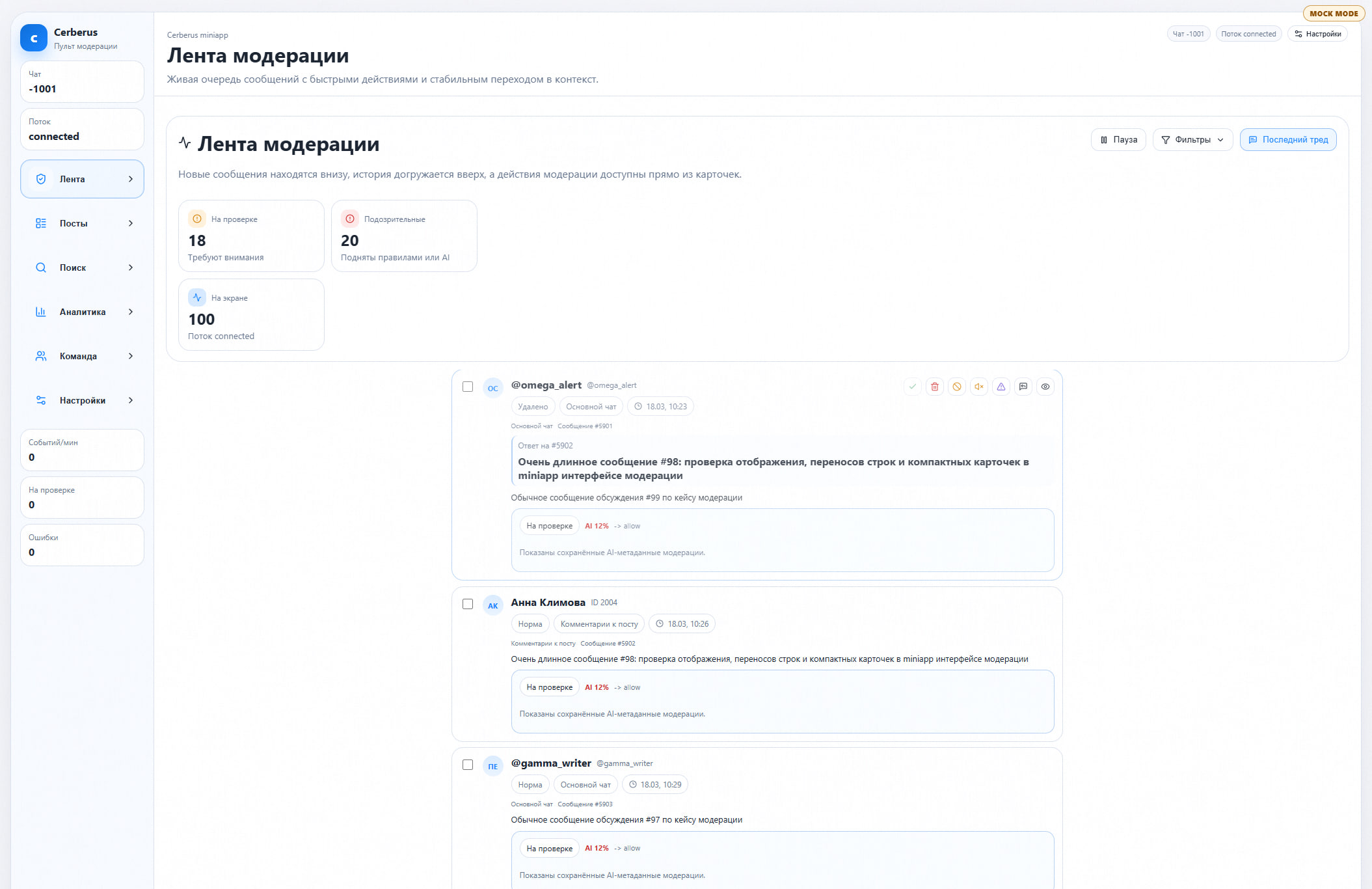
Available quick actions:
miniapp.action.delete— delete a messageminiapp.action.ban— ban a userminiapp.action.reply— reply to a userescalate— escalate to a higher-level moderator
When selecting a message, you can access “Thread Focus” — a thread context with separate scrolling:
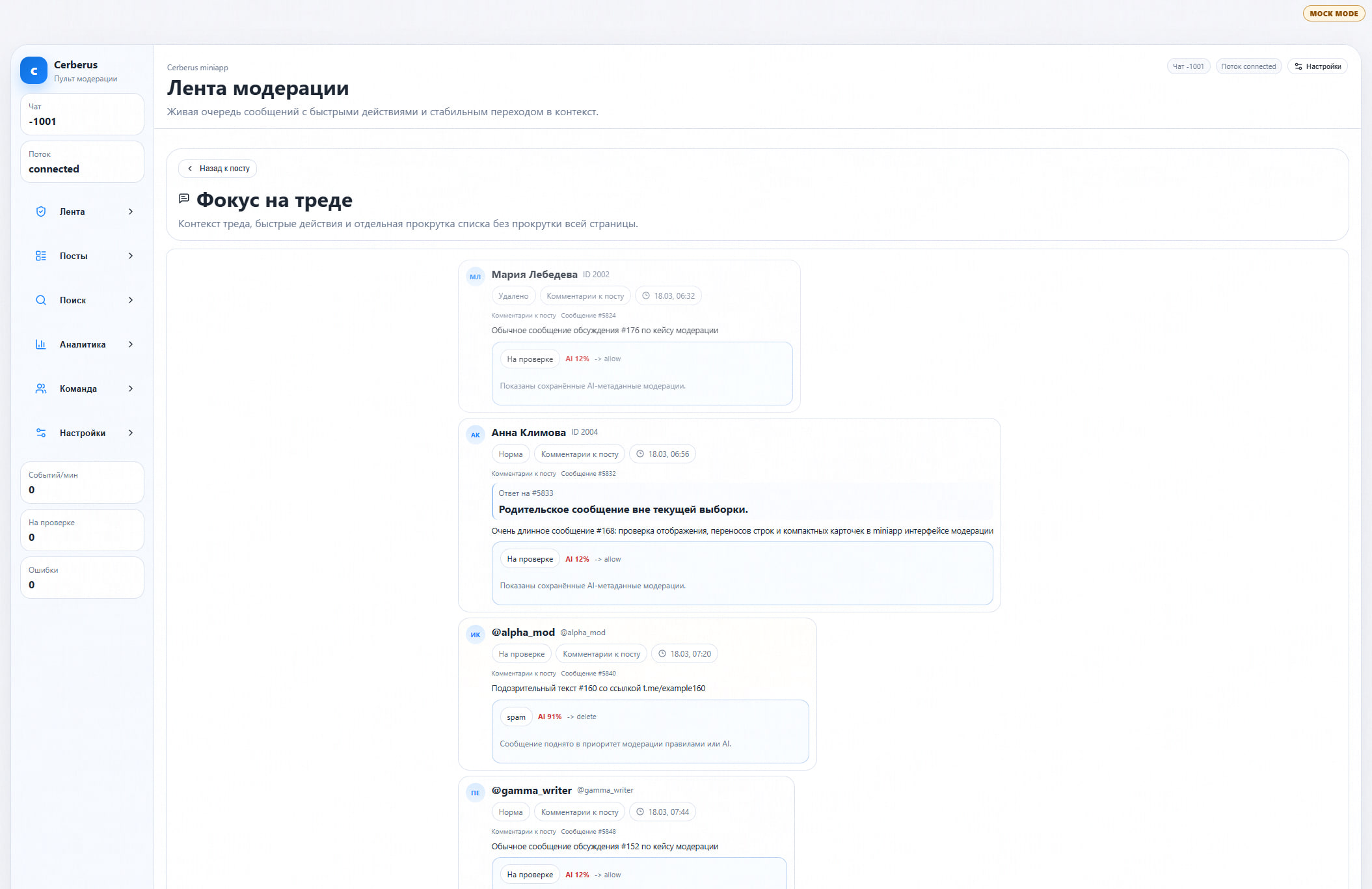
AI Moderation — Messages can be processed through an AI analyzer, which assigns:
ai_violation_type— violation type (e.g.,spam)ai_suggested_action— recommended action (e.g.,deleteorallow)- AI confidence score (displayed as
AI XX%)
The screenshots show how this works: normal messages receive AI 12% → allow (low confidence in violation, recommended to skip), while spam messages receive spam | AI 91% → delete (high confidence, recommended to delete). The caption “Message elevated to moderation priority by rules or AI” indicates automatic prioritization.
Message Search is a separate page with search by message text, username, or user ID with advanced filters:
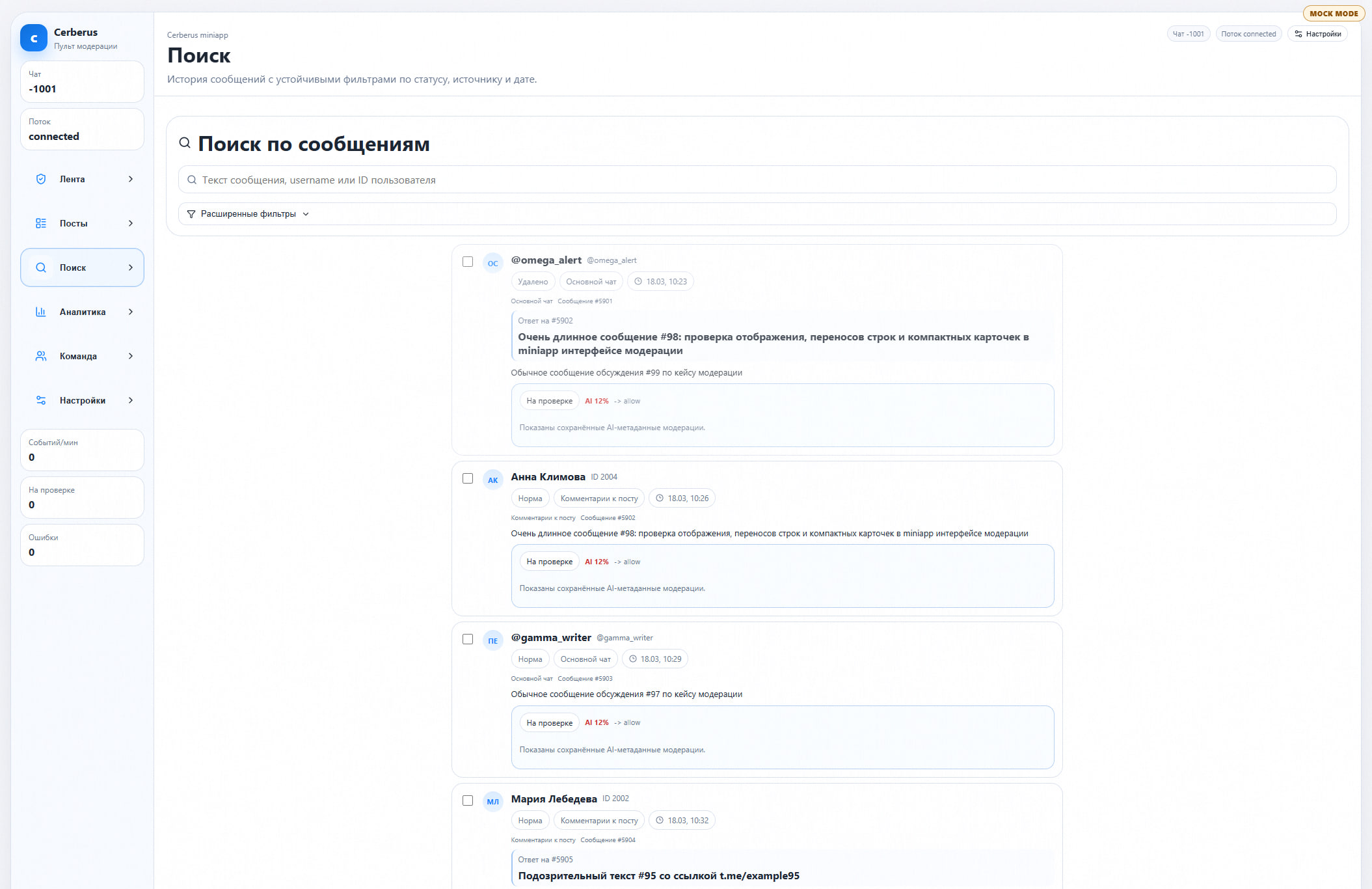
Auto-moderation settings - a page with configurable parameters:
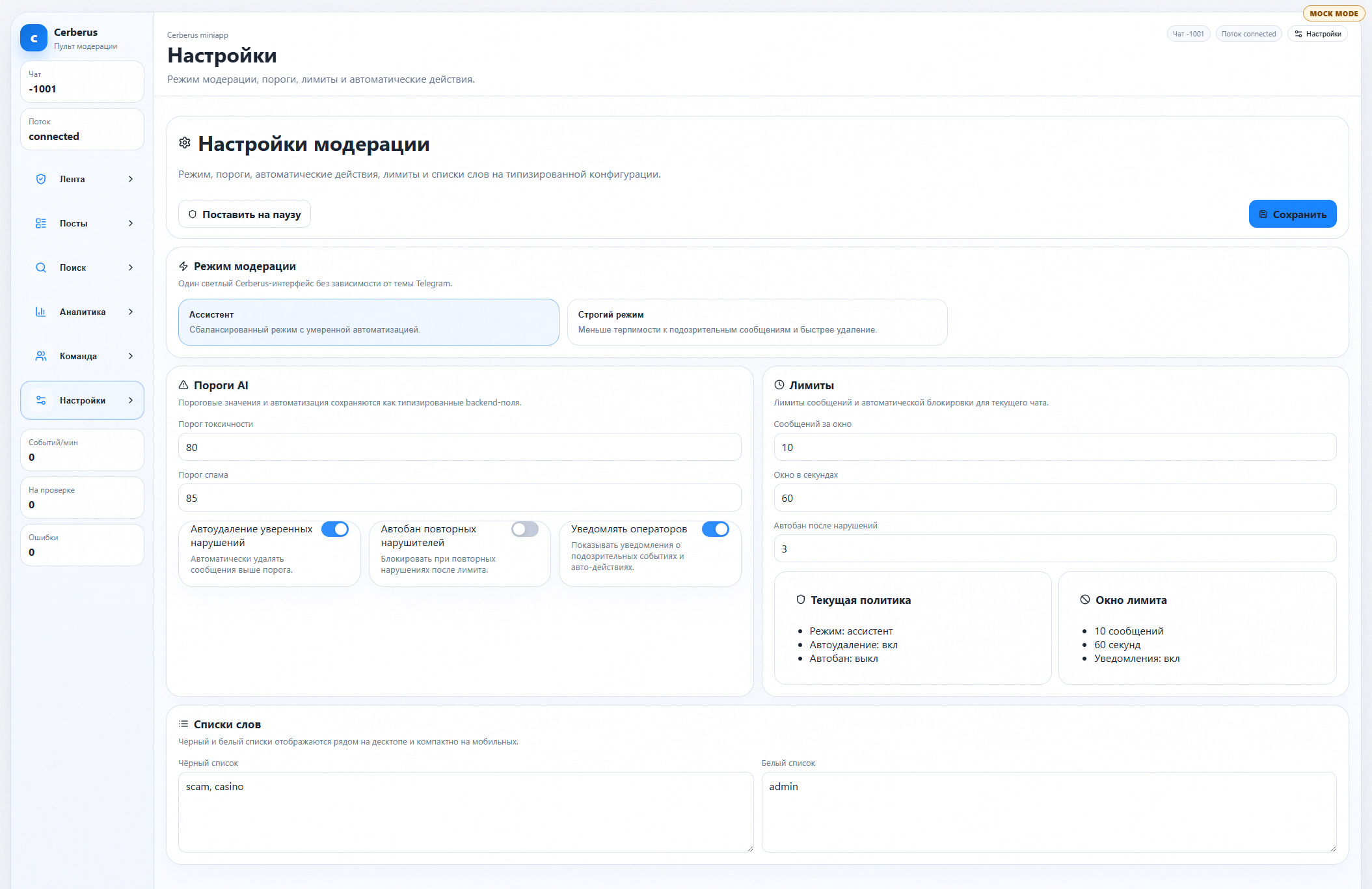
Two moderation modes:
- Assistant — balanced mode with moderate automation
- Strict — less tolerance for suspicious messages, faster deletion
AI Thresholds:
- Toxicity Threshold (default: 80%)
- Spam Threshold (default: 85%)
Automatic Actions:
- Auto-Delete Strong Violations — automatically delete messages above the threshold (enabled by default)
- Auto-Ban Repeat Violators — block for repeat violations after the limit (disabled by default)
- Notify Operators — show notifications about suspicious events and automatic actions (enabled by default)
Limits:
- Messages per Window (default: 10)
- Window in Seconds (default: 60)
- Auto-Ban After Violations (default: 3)
Wordlists:
- Blacklist (example:
scam, casino) - Whitelist (example:
admin)
Moderation team — managing team composition and member roles:
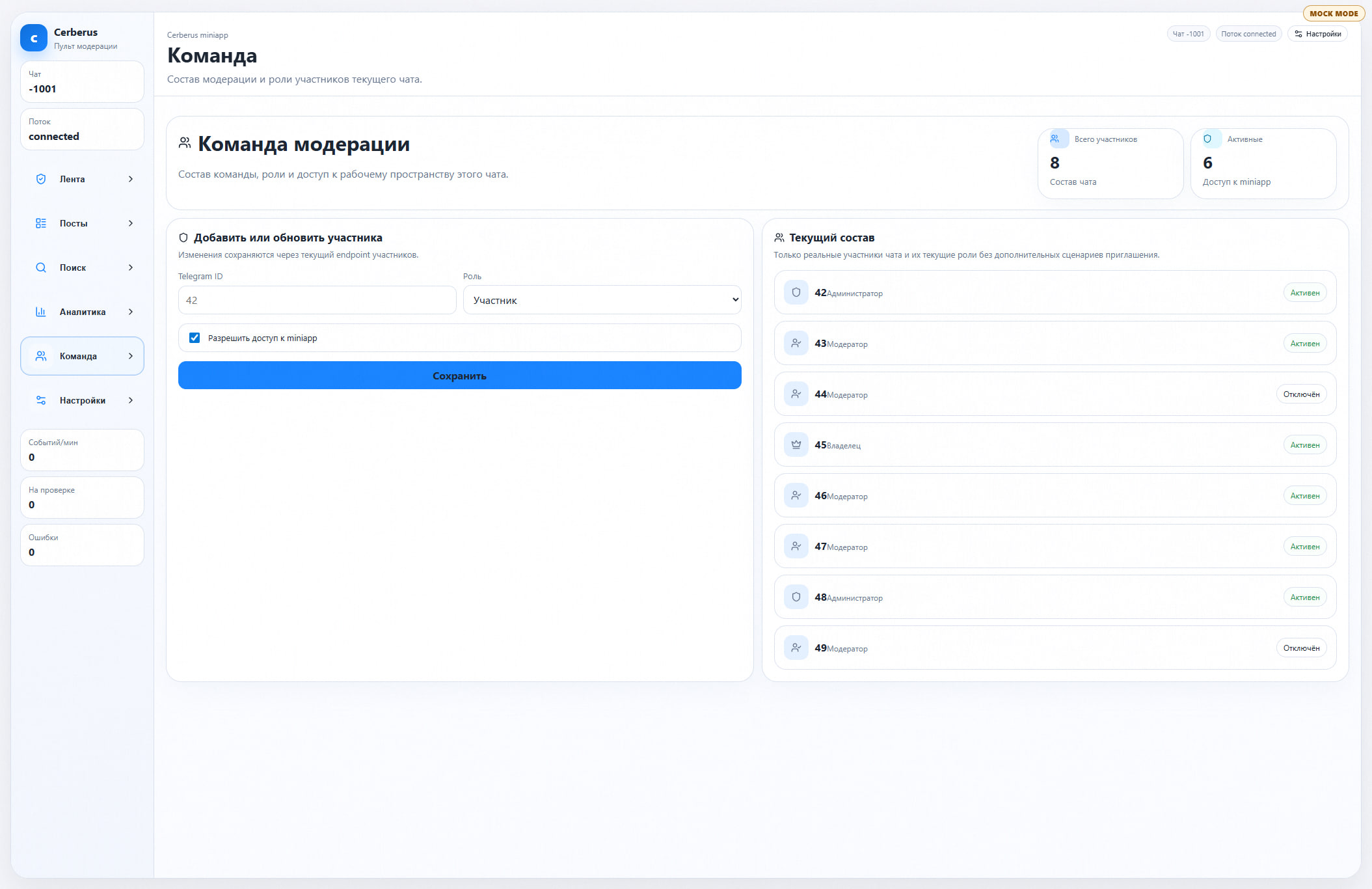
Roles: Owner, Administrator, Moderator. Members are added by Telegram ID, and access to the miniapp can be granted or denied for each member. The screenshot shows 8 members (6 active), with some moderators disabled.
Analytics — a summary of messages and moderation actions:
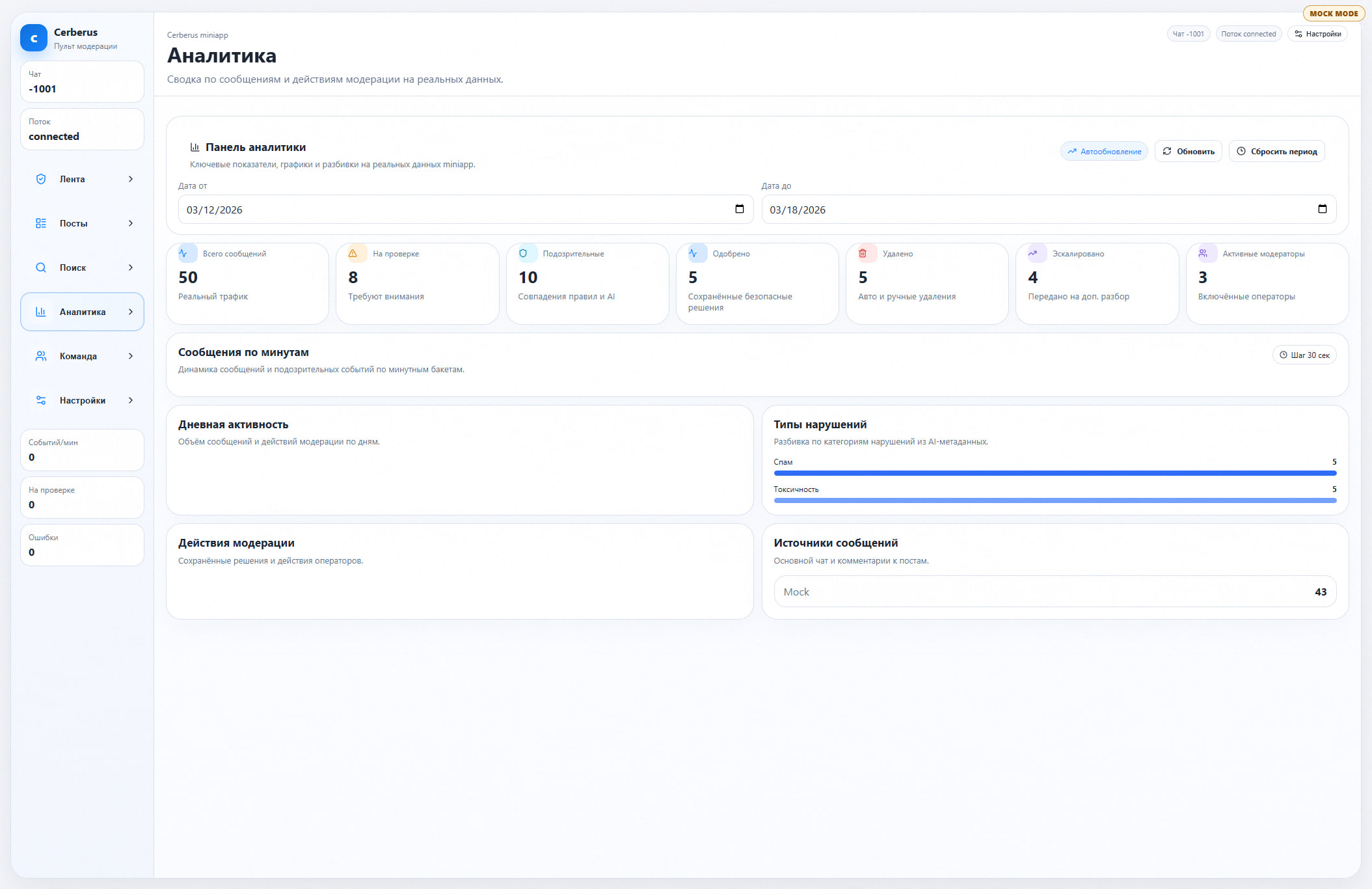
Key metrics: total messages, pending review, suspicious (rule matches and AI), approved, deleted (automatic and manual), escalated, active moderators. Breakdown by violation type (spam, toxicity), minute-by-minute and daily graphs, message sources.
Differences from Zeus
| Zeus | Cerberus | |
|---|---|---|
| Type | Web-based software | Telegram Mini App |
| Purpose | Helpdesk ticket system (processing RKN requests) | Real-time moderation |
| AI | No | Yes (classification of violations, recommendations, thresholds) |
| Automation | Manual processing | Automatic bans, automatic removal by thresholds |
| Live feed | No (only tickets) | Live feed with quick actions |
TL;DR: Two moderation software admin panels were found on Telega’s websites: Zeus — helpdesk ticket system to process requests from RKN (stream@rkn.gov.ru) and other agencies to block channels, bots and users; Cerberus — a Telegram Mini App to moderate messages in real time with AI analysis, automatic bans and automatic removal with changeable thresholds of toxicity and spam.
Do not use Telega — it’s the same Max but on minimum settings
We hope that this article is a comprehensive proof that Telega is not, in fact, a small independent harmless Russian startup, but a real malware which may have ties and support from Russian government in the worst case.
If anyone that you know uses this app — insist that they delete it immediately and close the session in the account settings. A single person with Telega installed compromises not only their privacy, but the privacy of all their peers — without any knowledge or consent.
Using Telega is like using a phone of someone you don’t know to log into Telegram and then giving the phone back. And this person has a relative working for police.
To make Telegram work again on your devices use only the official first-party app and the built-in proxy features. Using any other Telegram client jeopardises all your personal data, your Telegram account and your device.
In some sense Telega is even worse than Max — in the state-owned messenger app you don’t have years-long chats with your friends and loved ones that can be read and analysed, there’s no ability to check if you follow any “objectionable” channels, and most importantly, when using Telega you think that your data is secure — this is Telegram after all, not Max!